
Monetization opportunities on TikTok have now become a primary income stream for many content creators. The TikTok Affiliate program allows you to earn commissions from products promoted through videos or live sessions. However, the expectation that the registration process is as simple as toggling a single button in account settings often leads to rejection. Many new applicants fail because they overlook the layers of community policy verification and identity authenticity. Understanding the real process is the key to ensuring your time is not wasted.
Minimum Requirements Checklist and Account Compliance
Many creators assume that simply pressing the register button is enough to get approved, but account compliance is the first filter that often derails the process. Understanding the minimum requirements is not just a formality—it's the foundation that ensures your TikTok affiliate registration process doesn't end at the automatic rejection stage.
Why Do Many Creators Fail at the Initial Verification Stage?
The main cause isn't just an insufficient follower count, but data inconsistency. Many applicants use names or information that don't match their official identity documents. Additionally, accounts created with a region or location that doesn't correspond to a country where TikTok Shop is active are also likely to be rejected. The platform systematically validates users' regions before granting access to monetization features.
Risk Profile: New Accounts vs. Established Accounts
TikTok sets strict benchmarks. Users must be at least 18 years old, and accounts must have a minimum of 1,000 followers. The 1,000 figure isn't just a metric—it's an early indicator that you have a sufficient audience to drive conversions. Additionally, the account must be free of community policy violations within a certain period. Any violation history, no matter how minor, can backfire and delay the approval process.
There is a significant risk difference between new and established accounts. Newly created accounts that are forced to reach 1,000 followers in a single day risk being flagged as spam activity. Conversely, accounts that have been operating for several months with organic growth tend to pass identity verification and platform risk assessment more easily. Don't try to game the system by buying followers, as TikTok's bot detection algorithm is quite aggressive and will immediately nullify your registration chances.
Step-by-Step TikTok Affiliate Application Process
Once all minimum requirements are met, the actual registration steps are relatively quick, but many creators get stuck because they're unfamiliar with the menu layout within the TikTok app. This process differs from simply creating regular content, as it involves a formal submission to the TikTok Shop ecosystem.
Navigating the Creator Tools Menu and TikTok Shop Application
Open the TikTok app, go to your profile, and tap the three-line icon in the top-right corner. Select Creator Tools, then scroll down until you find the TikTok Shop Affiliate option. If this menu doesn't appear, the account likely doesn't meet the region or age requirements, or the TikTok app needs to be updated to the latest version. Tap the option, and the system will display a summary of the program's terms. Read it carefully, especially the sections on commissions and payout terms, before pressing the Apply button.
In the next step, you'll be asked to enter your bank account details and upload identity documents for verification. Make sure the name on your ID card or passport matches exactly with the name on your bank account, as data inconsistency is one of the most common causes of rejection. Once the form is submitted, the review process typically takes a few business days. Don't attempt to re-register before receiving an official decision, as duplicate submissions can slow down the verification process.
Post-Approval Strategy and Promotion Guidelines
Being accepted as an affiliate isn't the finish line—it's the beginning of compliance responsibilities. Many new creators lose their affiliate status by ignoring the promotion guidelines set by the platform. After completing the TikTok affiliate registration process, your main focus should shift from simply picking products to how you promote them ethically and sustainably.
Safe Practices to Maintain Your Affiliate Creator Status
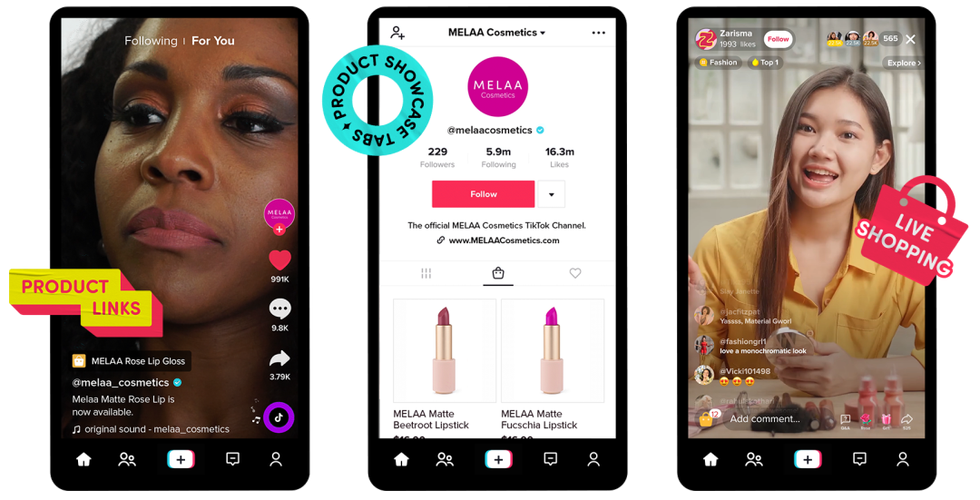
Safe practices for maintaining your affiliate creator status include transparency in endorsement content. You are required to explicitly disclose paid partnerships within the video or description. Operationally, avoid spamming affiliate links in the comment sections of other creators' accounts. This behavior not only damages your reputation but also violates community policies and can trigger unilateral account feature restrictions.
A practical principle to apply is choosing products that are genuinely relevant to your content niche, rather than simply chasing high commission percentages. TikTok's algorithm rewards authentic recommendations over forceful hard-selling. If your audience feels deceived or the product doesn't match the video's claims, engagement will plummet and the account risks being re-reviewed by the system. To deepen your marketing techniques, you can study advanced guides on effective product promotion. Follow these ethical boundaries and platform policies to keep your monetization career safe from suspension risks.
Common Questions About Affiliate Registration
Can Buying Followers Speed Up Affiliate Approval?
No. TikTok's algorithm can detect bot activity, and accounts with non-organic follower surges are at high risk of being rejected or permanently restricted.
How Long Does the Affiliate Registration Review Process Take?
The review process typically takes a few business days after all identity documents and bank details have been uploaded. The decision will be sent via a notification in the app.